Shopify cross sell and frequently bought together
A cross sell offers products that go with the one a shopper is looking at, like a case with a phone, and a frequently bought together box shows them as a set to add in one click. CRO Toolbox does both on Shopify: cross sell offers on the product page, the cart page and the cart drawer, and a Frequently bought together box with a discount when the set is bought together.
Last updated
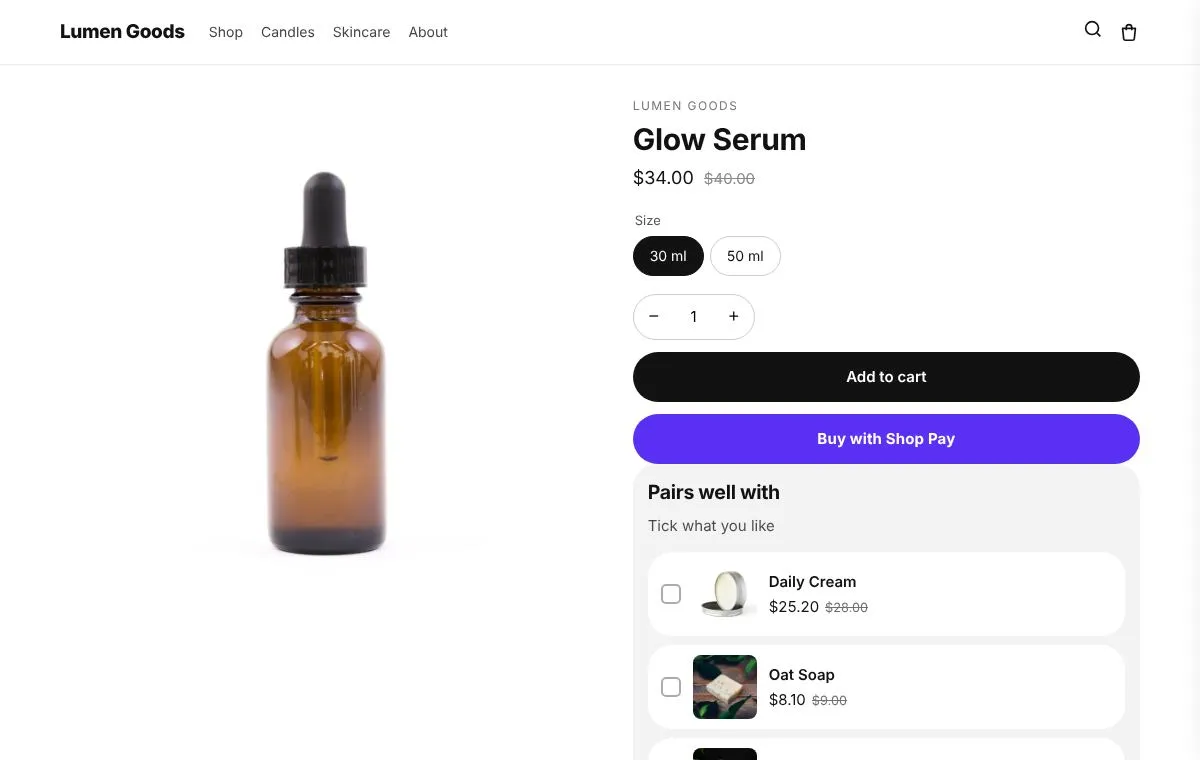
What is a cross sell?
A cross sell suggests a different product that completes the one in front of the shopper: a cream with a serum, matches with a candle, socks with shoes. It answers "what else do I need?" at the moment the shopper is deciding.
An upsell is the other way to raise order value: more of the same product or a better version of it. See Shopify upsell app.
How CRO Toolbox does cross sells
- Cross sell offers: products that pair well, shown with a box the shopper ticks to add them in one click. Nothing is ticked in advance.
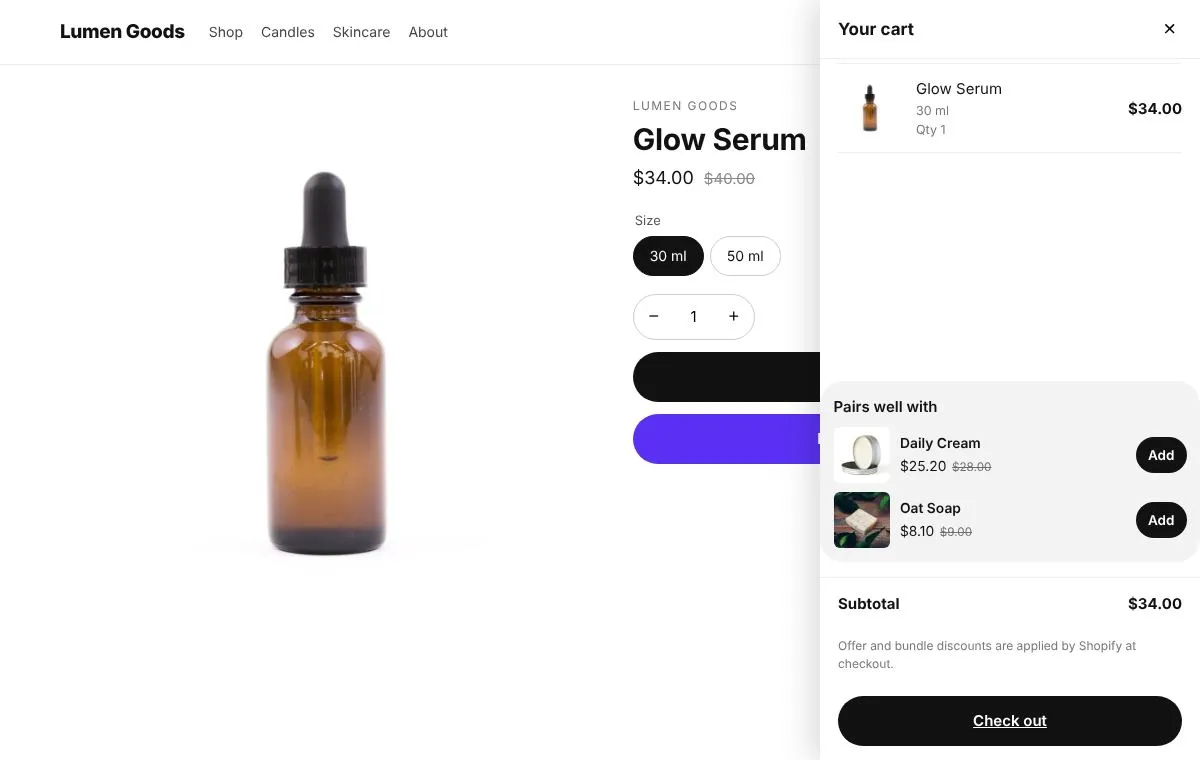
- Where they show: the product page, the cart page and the cart drawer. In the cart, the offer shows when a trigger product is in the cart.
- Optional discount: a percentage off the offered products, applied at checkout while a trigger product is also in the cart, however the products were added.
- Smart skipping: sold out products, the product being viewed and products already in the cart are left out automatically.
- Frequently bought together: A set of items shown on each item's page, with a discount when they're bought together. One button adds the whole set.
Products that no rule covers can show Shopify's own recommendations instead, chosen in the theme editor.
How to set up a cross sell offer
- Install CRO Toolbox and open Offers → Cross sell offers. Create an offer.
- Choose the trigger: all products, specific products, or products in collections.
- Pick the products to offer and where the offer appears: product page, cart page and/or cart drawer.
- Add an optional discount, then set the look in Style with the live preview.
- Place the block in the theme editor and save.
Offers inside your theme's own cart drawer work with Dawn and Dawn based themes.
For a Frequently bought together box, open Bundles → Create bundle, choose Frequently bought together, pick two or three items and a discount. The box shows on the product page of every item in the set. Step by step: how to add Frequently bought together to a Shopify theme.
Cross sell offer or frequently bought together?
| Cross sell offer | Frequently bought together | |
|---|---|---|
| What shoppers see | Products that pair well, ticked and added in one click | The product and its set, with the total and one button to add all |
| Where | Product page, cart page and cart drawer | The product page of every item in the set |
| Discount | Optional percentage off the offered products | A discount when the whole set is in the cart |
| Best for | Stores with products that go together, like a case with a phone or a cream with a serum. | Accessories that go with a product |
| Plan | Free | Free |
Which plan you need
| Feature | Plan | Price and limits |
|---|---|---|
| Cross sell offers | Free and above | Free: 3 offers on at once, 50 orders a month |
| Offers in your theme's cart | Free and above | Free: 3 offers on at once, 50 orders a month |
| Bundles | Free and above | Free: 3 offers on at once, 50 orders a month |
Prices in US dollars, billed by Shopify. Every plan and its limits: pricing.
See it on a demo store
The live demos show the app's real storefront blocks on a sample store, so you can click through them before you install.
Questions
What is the difference between cross selling and upselling?
Cross selling offers a different product that goes with the one in the cart, like a case with a phone. Upselling offers more of the same product or a better version of it. CRO Toolbox has upsell offers and cross sell offers.
Are cross sell products added to the cart automatically?
No. The shopper ticks the products they want and adds them in one click; nothing is ticked in advance.
Does the cross sell discount apply at checkout?
Yes. The percentage off the offered products applies at checkout while a trigger product is also in the cart, however the products were added.
Can I show cross sells in the cart drawer?
Yes. An offer can appear on the product page, the cart page and the cart drawer. Offers inside your theme's own cart drawer work with Dawn and Dawn based themes.
How do I add frequently bought together on Shopify?
In CRO Toolbox open Bundles, create a Frequently bought together bundle, pick two or three items and a discount, and save. The box shows on the product page of every item in the set, and Shopify applies the discount at checkout when the whole set is in the cart.
Which plan do I need?
Cross sell offers and Frequently bought together are on the Free plan. The Free plan allows 3 offers on at once and 50 orders a month. Paid plans start at $5.99 a month, with unlimited offers on at once. See pricing.
Be first to install CRO Toolbox
CRO Toolbox is on its way to the Shopify App Store. The install button on this site will go straight to the listing the day it's live, with the Free plan and a 14 day trial on every paid plan.