Post purchase upsell examples for Shopify
Post purchase upsell examples for Shopify: what to offer right after payment, how to price it, which products are a poor fit, and how to set up a one click offer.
The best post purchase upsell is a small, useful extra that fits almost any order you get: a refill, a matching item, a bigger size or an accessory, at a modest discount. The shopper has just paid, so the offer has to be an easy yes that needs no thinking. Below are examples that tend to fit, price ideas, products to avoid, and how to set up the offer in CRO Toolbox.
What is a post purchase upsell?
It is an offer shown right after the shopper pays and before the thank you page. Accepting adds the product to the order they just placed, without entering card details again. Shopify adds it to the same order and shipment, so there is no second delivery.
Because the first order is already placed, the offer can’t put that sale at risk. That is what makes this moment different from the cart or the product page. For a full overview, see the post purchase upsell page.
What should I offer right after payment?
Pick something that makes sense next to most of your orders. Some examples:
- A refill or a second unit. Coffee pods with a coffee order, a refill pack with a cleaning product, a second tube of the serum they just bought.
- The matching item. The pillowcase that goes with the duvet cover, the belt that goes with the trousers, a lid for the storage jar.
- A bigger or travel size. A travel size of a skincare product, a family size of a snack, a larger bottle of a supplement.
- An accessory. A case for a phone accessory, a cleaning cloth for glasses, spare laces for shoes, a gift box.
- A small consumable. Batteries, filters, replacement heads, wax for a candle warmer.
The common thread: low price compared with the order, no decision about sizes or styles, and an obvious link to what they bought.
How should I price the offer?
The shopper sees one product and one price, so make the reason to say yes clear.
- A modest discount. In CRO Toolbox you set the discount from 0 to 90% off. A small discount such as 10% or 15% on an item that already fits the order is a common start.
- A price well below the order. As an example, on a typical order of $60, an extra that costs $8 to $15 after the discount is easier to accept than one at $40.
- A minimum order amount. Turn on Only for bigger orders and set Orders from if the offer only makes sense above a certain order value. With it off, every order sees the offer.
- No discount at all. This can work for a product people buy anyway, such as a refill, where the convenience of adding it to the same shipment is the reason.
Avoid deep discounts on your best sellers before you have seen how shoppers react. Check that the discounted price still leaves you a margin after shipping.
Which products are a poor fit?
Some products make a weak post purchase offer:
- Products with many sizes or colours. The shopper has no time to compare options here. Pick a product or variant that works for everyone.
- Expensive items. A product that costs as much as the order needs more thought than this moment allows.
- Products unrelated to the order. If most shoppers won’t see the link, the offer feels random.
- Items often out of stock. Choose something you can ship with every order.
- The product they just bought, for most stores. CRO Toolbox doesn’t show the offer when the product is already in the order, so choose something they don’t already have.
One more thing to keep in mind: CRO Toolbox shows one product as the after purchase offer, and the same offer appears on every order that meets your minimum amount. So choose a product that fits the widest range of orders, not just one product line.
Which payment methods show the offer?
Shopify shows after purchase offers for card and Shop Pay payments. Shoppers who pay another way don’t see the offer, so don’t count on every order reaching it.
How does the one click offer work in CRO Toolbox?
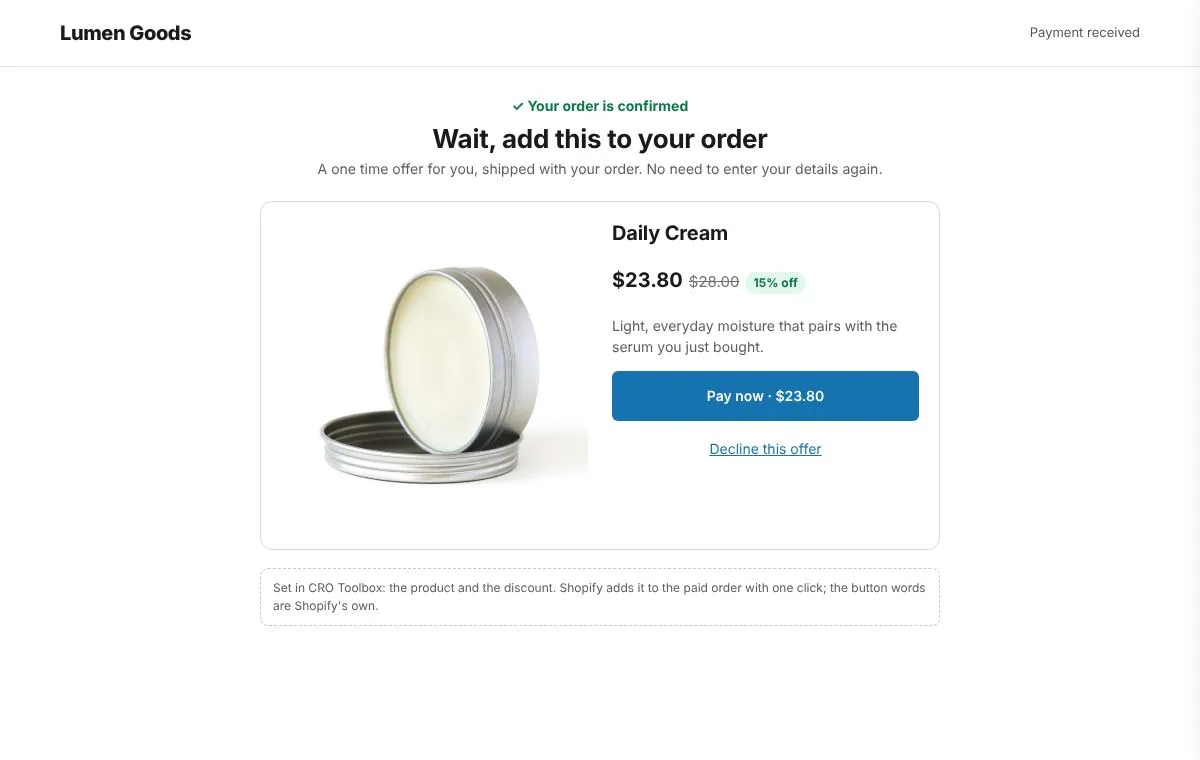
The shopper sees your heading and text, then the product and the discount. The product and discount are added after your text, for example “Get 15% off Travel case.” Before accepting, they see the price, shipping and taxes. The buttons read “Pay now” and “Decline this offer”: that is Shopify’s fixed wording for after purchase offers, so you can’t change it.
When they accept, the product is added to the same order and shipment with no new payment details.
How do I set it up?
- In the app, open Offers → Upsell → After purchase.
- Click Choose a product and pick the product.
- Set the Discount. If you want the offer only above a certain order value, turn on Only for bigger orders and set Orders from.
- Write the Heading and Text, then switch the offer on.
- In Shopify, open Settings → Checkout and under Post purchase page choose CRO Toolbox.
- Place a test order with a card and check the offer after payment.
The checkout help guide covers the same steps. The after purchase offer is on the Free plan and uses one of the plan’s 3 offers on at once; paid plans start at $5.99 a month for Starter. See pricing and the after purchase offer feature page.
What comes after the offer?
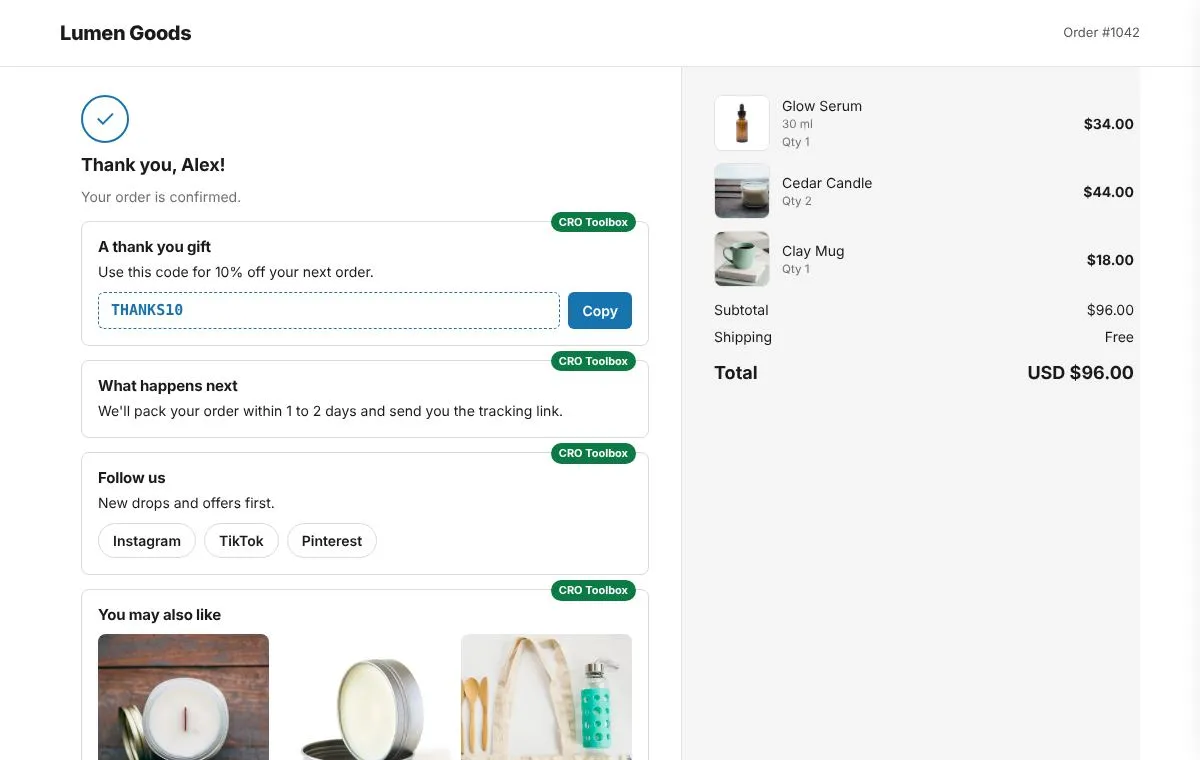
The thank you page comes next. CRO Toolbox can add modules there: a discount code for the next order with a copy button, a message, follow us buttons and product suggestions. These look ahead to the next order rather than this one, so they work well together with the after purchase offer. The thank you page ideas article goes through each module.
How do I know if it works?
Watch how often shoppers accept the offer and whether average order value moves. CRO Toolbox’s Analytics shows sales from each offer. If acceptance is low after a few weeks, try a different product before you raise the discount: the fit of the product often matters more than the price.
Quick checklist
- One product that fits most of your orders
- No size or colour choice needed
- A price well below the typical order
- A modest discount, or none for a refill
- A minimum order amount if the offer only fits bigger orders
- CRO Toolbox chosen under Post purchase page in Shopify’s checkout settings
- A test order paid by card to check it shows