How to set a free shipping threshold: the maths, step by step
How to set a free shipping threshold on Shopify: work out what it costs and what it must earn back from your average order, margin and shipping cost.
To set a free shipping threshold, start from your average order value and set the goal a little above it, at an amount most shoppers can reach by adding one more item. Then check the maths: the threshold costs you shipping on every order that reaches it, so the extra margin from shoppers who top up their order has to pay for that. Here is how to work it out with your own numbers and how to show the goal with a free shipping bar.
What numbers do I need?
Four numbers, all for the same period, for example the last 30 or 90 days:
- Average order value. Your sales divided by your number of orders. Shopify shows it in Analytics.
- How many orders are above each amount. Export your orders from Shopify and count how many were over $40, $50, $60 and so on. This tells you how many orders would get free shipping without changing anything.
- Gross margin. What you keep from each sale after the cost of the product, as a percentage.
- What free shipping costs you per order. If you charge shoppers for shipping today, this is the fee you would stop collecting. If you already pay part of the shipping yourself, only the part shoppers pay today is new cost.
What does a threshold cost?
A threshold costs you the shipping fee on two kinds of orders:
- Orders that were already above it. These shoppers would have spent that much anyway. Free shipping on their orders is pure cost.
- Orders that top up to reach it. These shoppers add something to get free shipping. You lose the fee, but you earn margin on what they added.
So the lower the threshold, the more orders fall in the first group, and the more it costs you for nothing in return.
What does it have to earn back?
Each order that tops up earns its extra spend times your gross margin, minus the shipping fee you no longer collect:
Net gain per top up = extra spend × gross margin minus shipping fee
If that number is small or negative, the threshold is too close to what shoppers already spend, or your margin is too thin for free shipping to pay for itself.
To find how many top ups you need:
Top ups needed = (orders already above the threshold × shipping fee) ÷ net gain per top up
There is one more effect you can’t calculate in advance: some shoppers who would have left at the shipping cost may now buy. Count those when you measure the result, not when you plan.
A worked example
The numbers below are made up for this example. Use your own.
An example store has:
- 1,000 orders a month, with an average order of $40
- a 60% gross margin on its products
- shipping that costs the store $7 an order, of which shoppers pay a flat $5 today
Free shipping costs this store $5 on each order that gets it: the fee it stops collecting. It already pays the other $2.
Threshold at $45. Say 400 of its orders are already $45 or more. Free shipping on those costs 400 × $5 = $2,000 a month. A shopper at $40 who adds a $10 item to reach $45 earns $10 × 60% = $6 of margin, minus the $5 fee: $1 net. The store would need 2,000 top ups a month to break even, more than it has orders. This threshold loses money.
Threshold at $55. Say 150 of its orders are already $55 or more. That costs 150 × $5 = $750 a month. A shopper at $40 who adds a $20 item to reach $60 earns $20 × 60% = $12, minus $5: $7 net. The store needs about 107 top ups a month (750 ÷ 7) to break even, roughly 1 in 8 of the 850 orders under $55. Whether that happens is something to measure, but it is a reachable target.
The lesson from the example: a threshold just above your average order often gives shipping away to orders that were already big. A threshold that needs one more real item asks shoppers for enough extra spend to cover the fee.
How do I pick the amount?
- Start from your average order and look at the prices of items shoppers often add, like a refill, a second pair or a small accessory. A good threshold is about one of those above a typical order.
- Check how many orders are already above it. If a large share of orders already qualify, the threshold costs a lot for little return.
- Make sure there’s something to add. A threshold only works if shoppers can find a sensible item to reach it. A cross sell in the cart or a quantity break helps.
- Use one goal everywhere. If you also give free shipping with a rate in Shopify’s shipping settings, use the same amount, so shoppers don’t see two different goals.
When free shipping isn’t a good fit: if your margins are thin and shipping is heavy or expensive, the maths may never work. A lower flat rate can be more honest than a threshold most shoppers can’t reach.
How do I show a free shipping bar?
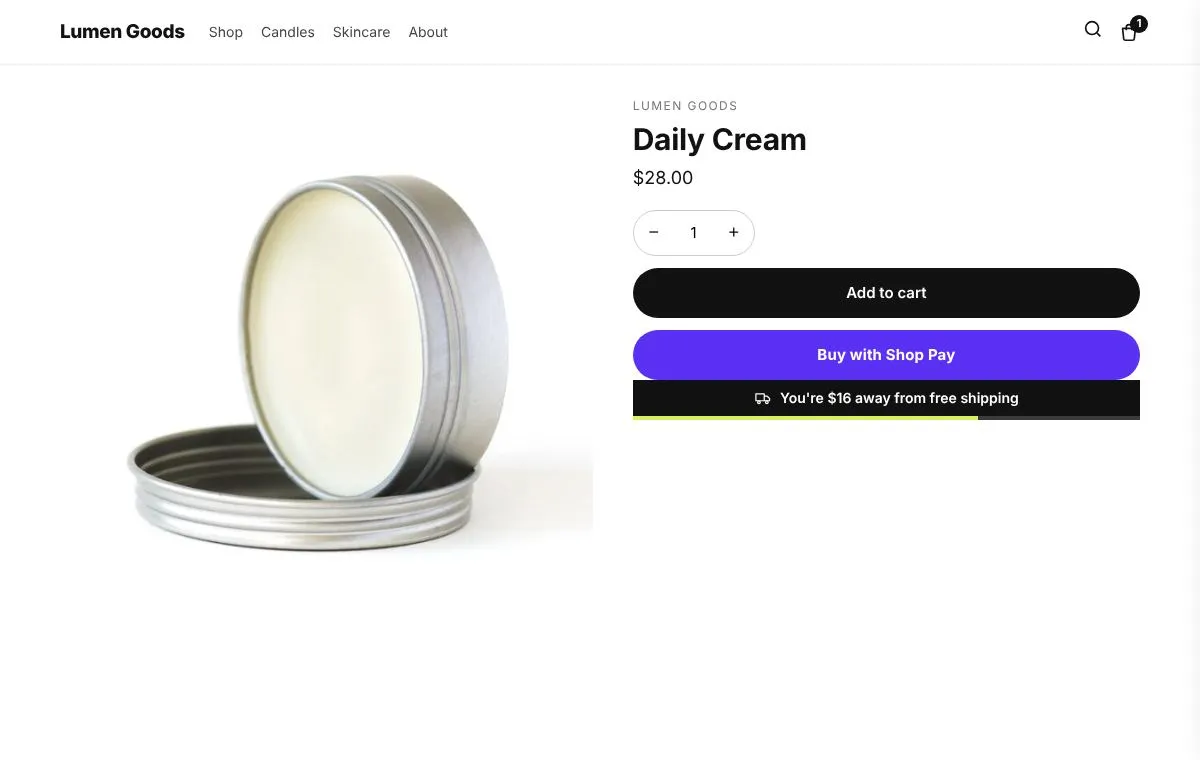
A free shipping bar shows shoppers how much more to spend for free shipping, so the goal is visible while they shop. In CRO Toolbox:
- Open Cart & Checkout → Free shipping bar.
- Set the goal amount and the messages.
- Keep Give free shipping automatically on (the default). Saving creates or updates the automatic discount “CRO Toolbox free shipping”: free shipping on orders from the goal amount. Turning the bar or this option off switches the discount off.
- Choose where it shows inside the cart: in the cart drawer and on the cart page, above the products or just above the checkout button. This needs the Conversion boosters app embed on, or the bar block in the header. See turn on the app embeds.
- For a bar at the top of the store, place the block in the Header area in the theme editor.
- Place a test order below the goal and one above it, and check the shipping at checkout. Add any other discounts you run to the test cart too, so you can see how they work together.
The announcement bar can also show free shipping progress at the top of the store. Full details are in the cart help guide and on the free shipping bar feature page. The free shipping bar is on the Free plan.
How do I know if the threshold works?
Compare the same number of days before and after. Watch three things:
- Average order value, in Shopify’s Analytics
- The share of orders above the threshold, from your order export
- What shipping cost you, against the margin from the extra spend
If average order value didn’t move but shipping costs rose, the threshold is too low. If almost nobody reaches it, it’s too high or there’s nothing sensible to add. Change one thing at a time. More ways to raise order value: how to increase average order value on Shopify and the raise average order value page.
Quick checklist
- Average order value, orders above each amount, gross margin, shipping fee
- Net gain per top up above zero
- Few orders already above the threshold
- An item shoppers can add to reach it
- One goal in the bar and in Shopify’s shipping settings
- Test orders below and above the goal