How to set up a loyalty program on Shopify
How to set up a points and rewards program on Shopify: what should earn points, which rewards to offer, how to handle guests and refunds, and where members see their points.
A loyalty program on Shopify gives customers points for orders and other actions, and lets them spend those points on rewards such as money off, free shipping or a free product. To set one up, decide what earns points, pick a few rewards with clear point prices, choose how guests and refunds are handled, and show the points where shoppers already look: a rewards button, the product page, the cart and the customer account. Below is how to plan each part, and how to do it with CRO Toolbox.
What is a points program, and who is it for?
A points program turns repeat buying into something the customer can see: every order adds to a balance, and the balance unlocks a reward. It suits stores whose customers can reasonably buy again, such as beauty, food and drink, pet supplies, coffee, apparel basics and gifts. It does less for products bought once every few years, where a referral program or good after sales care usually matters more.
Keep the first version simple. One way to earn on orders, two or three extras, and three or four rewards is easier for shoppers to understand than a long menu.
What should earn points?
Start with orders, then add actions that help your store:
- Paid orders. Points per unit of your currency spent. Decide whether shipping and taxes count; most stores count only what was spent on products.
- Creating an account. It turns a guest into a customer you can recognise next time.
- The first order. A one time bonus that makes the first reward feel closer.
- Birthdays. A small yearly gift that gives a reason to come back.
- Product reviews and social follows. Useful when you want more reviews or followers; keep the points modest.
If you sell to wholesale customers through the same store, exclude them, so they don’t earn on trade prices.
Which rewards should you offer?
Rewards are what members spend their points on. Common ones:
- An amount off (for example $5 off), simple and easy to understand.
- A percent off an order.
- Free shipping, useful when shipping is the main reason carts are left.
- A free product, ideally a small item that costs you little and introduces another product.
- Store credit, which stays in your store for the next order.
Price each reward in points so the first one is reachable within a normal number of orders for your store, and the bigger ones give regulars something to aim for. Look at your own repeat order data before choosing; there is no single right number for every store.
How should guests, refunds and returns work?
Three decisions avoid most problems later:
- Guests. Many shoppers check out without an account. Decide whether their orders earn points straight away (kept for their email until they sign in), only once they create an account, or not at all.
- Refunds and cancellations. Points from a refunded or cancelled order should be taken back.
- A pending period. Holding new points for some days before they can be spent means an order that is returned never gives points that were already used.
Where should members see their points?
Points work only if shoppers notice them. Show them:
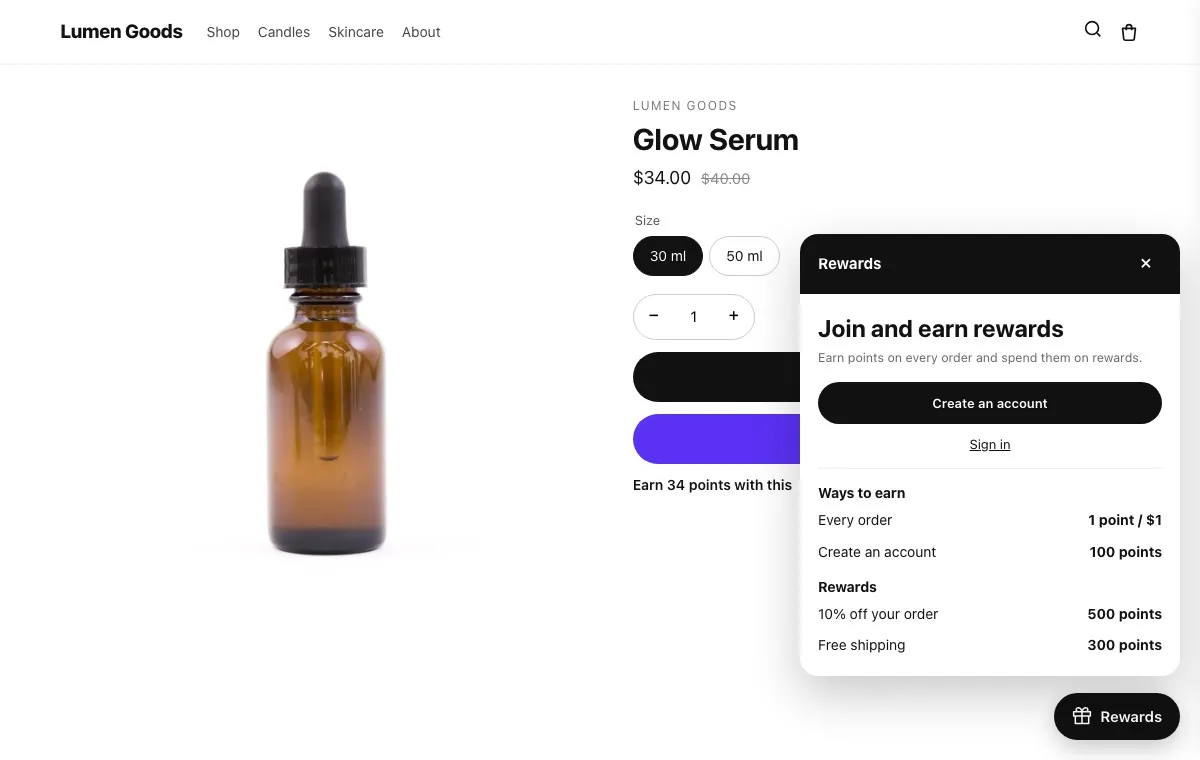
- In a rewards button on every page, which opens a panel with the balance, ways to earn and rewards.
- On product pages, as “Earn X points with this”.
- In the cart, before checkout.
- On a Rewards page and in the customer account.
- On the thank you page, right after an order.
How do I set up a loyalty program with CRO Toolbox?
The loyalty program is on the Growth plan ($19.99 a month) and the Pro plan ($39.99 a month). Growth includes 500 orders that earn points a month and Pro 2,000.
- In the app, open Loyalty → Earn points. Set points per unit of your currency on paid orders (with or without shipping and taxes), and turn on the extras you want: the first order, creating an account, birthdays, social follows and product reviews. List customer tags that can’t join, such as wholesale.
- Open Rewards and add what members spend points on: an amount or percent off, free shipping, a free product or store credit, with the points each costs and how many days a reward code stays valid.
- Under Earn points → Accounts → Orders placed as a guest, choose whether guest orders earn right away, once the customer creates an account, or not at all.
- On Loyalty home, turn the program on and choose which orders count when it starts: from now on, or also the last 30 or 90 days.
- In your theme, turn on the Conversion boosters app embed. The rewards button then shows on every page. For a Rewards page, add the Order & wishlist pages block to a page template.
- On Look, set the colours, where the button sits and every word the widget shows.
Points count once an order is paid, a refund or cancellation takes them back, and new points stay pending for 14 days by default. The loyalty program help guide has every setting.
What can I add later?
Once the basics run, a few extras can help:
- A Points shop: products members get with points, or with points plus a smaller price, including products sold only with points.
- Referrals: a friend gets a discount on their first order, and the member gets a gift once that order is paid. See how to set up a referral program on Shopify.
- On Pro: VIP tiers, bonus campaigns, product and collection rules, cashback, affiliate links, and Klaviyo, Omnisend, Judge.me and Shopify Flow.
Loyalty emails (welcome, points earned, reward ready) are coming soon in CRO Toolbox; until then, members see their points in the widget, on the Rewards page and in their account.
Quick checklist
- Orders earn points, plus two or three extras that help your store
- Three or four rewards, the first one reachable
- Guests, refunds and a pending period decided
- Points visible on every page, product pages, the cart and the account
- Wholesale or staff tags excluded
More on the feature: loyalty program and pricing.