How to A/B test upsell and cross sell offers on Shopify
How to A/B test upsell and cross sell offers on Shopify: change one thing at a time, how long to run a test, what to measure, and when a holdout test fits better.
To A/B test an upsell or cross sell offer on Shopify, show half of your shoppers the offer as it is (version A) and the other half a version with one change (version B), then compare orders and revenue per shopper once enough people have seen both. Change one thing at a time, run the test for full weeks, and don’t call a winner early. Below is how to plan a test, what to measure, and how A/B tests and the holdout test work in CRO Toolbox.
What is an A/B test for an offer?
It is a fair comparison between two versions of the same offer. Shoppers are split at random, and each shopper keeps seeing the same version for their visits. That way the orders from each group can be told apart, and a difference in results comes from the change you made rather than from who happened to visit.
What should I test first?
Start with the change most likely to matter for your store. Some ideas:
- The discount. For example 10% off the second item against 15%.
- The words. A headline that names the benefit against one that names the saving.
- The discount label. “Save 15%” against “15% off”.
- The style. A card layout against a grouped list.
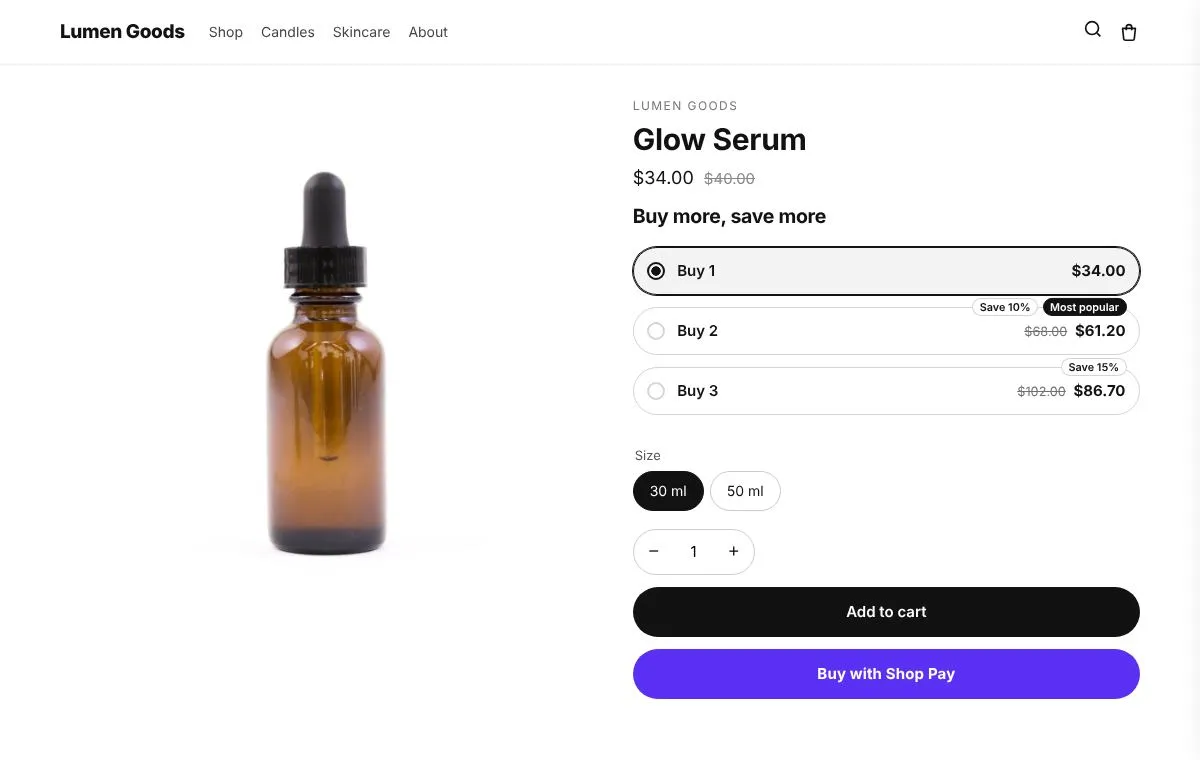
- The tier discounts on quantity breaks, such as Buy 2 at 10% and Buy 3 at 15%, against Buy 2 at 5% and Buy 3 at 20%.
Test one change at a time. If version B has a new headline, a bigger discount and a new style, you won’t know which of the three made the difference.
How long should a test run?
Long enough to cover full weeks and to collect enough orders. Shoppers behave differently on weekdays and weekends, and around paydays and sales, so a test that runs from Monday to Thursday only sees part of the picture. Two full weeks is a reasonable minimum for most stores, and many tests need longer.
Don’t stop a test the first day one version looks ahead. Early leads often shrink or flip as more orders come in.
Is my store big enough to A/B test?
Be honest about this one. An A/B test needs enough shoppers and orders on the page where the offer shows. A small store may run a test for weeks and still not get a clear result, because a handful of orders can swing either way.
CRO Toolbox doesn’t say which version is ahead until each version has been seen by 100 shoppers and the two versions together have 10 orders. Even past that point, a small difference stays “No clear difference yet” until there is more data. If your store gets few orders, test bigger changes (such as a different discount) rather than small wording tweaks, or use the time to improve the offer itself and test later.
What should I measure?
Pick the main number before you start, so you don’t choose the one that happens to look best afterwards.
- Orders per 100 shoppers. How often shoppers who saw each version placed an order. This is the conversion side.
- Revenue per shopper. What each shopper who saw the version spent on average. This catches a version that gets fewer orders but bigger ones.
- Offer acceptance. How many orders added the offer. A higher discount can raise acceptance and still lower revenue per shopper.
- Average order value. Compare it in Shopify’s Analytics over the same days. See how to increase AOV on Shopify for what moves it.
A bigger discount often looks good on acceptance alone. Revenue per shopper tells you whether it paid for itself.
How do A/B tests work in CRO Toolbox?
A/B tests are on the Pro plan, at $39.99 a month. You can test an upsell offer or a cross sell offer:
- Version A is the offer as it is saved. Version B changes the words, the discount or the style.
- Shoppers are split evenly between the versions (up to four: A, B, C and D), and each shopper keeps one version.
- Results count real shoppers and real orders: shoppers who saw each version, orders that added the offer, orders, orders per 100 shoppers, revenue and revenue per shopper.
- The app says which version is ahead and how sure it is only when there is enough data.
- When you are done, one click uses the winner.
One detail for cross sells: if the cross sell also shows in the cart drawer, the drawer can only show version A’s discount. In that case, test the words and the style, or take the drawer out of the offer to test the discount.
How do I set up an A/B test?
- Make sure the offer is switched on. Upsells live in Offers → Upsell offers, cross sells in Offers → Cross sell offers (see the upsell offers help guide).
- Open Offers and, in the A/B tests section, click Open A/B tests.
- Under Start a test, choose the Offer to test and give the test a name, for example “Bundle offer: bigger discount”.
- Change one thing for version B: the Headline, the Text under the headline, the Button (cross sells), the Discount label, the Discount, the tier discounts or the Style. To try more ideas at once, click Add a version for versions C and D, each with its own change (more versions need more shoppers before a winner shows).
- Click Start the test.
- Check back after a week or two. When the app shows a clear leader, click Use version B (or C, D) or Keep version A. To end a test with no change, click Stop without choosing.
More on the feature: A/B tests feature page.
What is a holdout test, and when should I use it?
An A/B test compares two to four versions of one offer. A holdout test answers a different question: what do the app’s widgets add to your sales overall?
In the holdout test, a share of shoppers, picked at random and kept for their visits, see your store without the app’s widgets. Orders from each group are compared. It is on the Growth plan and above, from $19.99 a month.
To run it:
- Make sure the Conversion boosters app embed is on in your theme (see turn on app embeds).
- In the app, open Analytics and the Holdout test tab.
- Set Shoppers in the holdout, from 5% to 50%. The app suggests 10% as a good start: few shoppers miss out, and results come in a few weeks.
- Switch on Run the test.
The lift shows once each group has at least 5 orders, and more orders make it more certain. The analytics help guide has the details, and the Shopify CRO page puts both tests in context with the rest of the store.
What mistakes should I avoid?
- Changing the offer during the test. Edits to version A mid test mix two experiments into one.
- Running tests during a big sale and treating the result as normal behaviour.
- Testing several offers on the same product at once. Keep one test per page where you can.
- Reading too much into a “likely” result. The app marks a lead as likely, not certain, when the evidence is thinner. Treat it as a hint and let it run longer if you can.
Quick checklist
- One change between version A and version B
- The main number chosen before you start
- At least two full weeks, longer for smaller stores
- No edits to the offer while the test runs
- A winner only once the app shows a clear leader
- A holdout test when you want to know what the app adds overall